Travelling on Jubilee
Jubilee is our vehicle-only vessel, and the crossing is a little different to our other services. Here’s what to expect.
What is Jubilee?
Jubilee is a vehicle-only vessel. We’ve added extra services in October on Jubilee, alongside our regular schedule.
How do I know if my service is on Jubilee?
When you book online, Jubilee services are marked on the trip details. Please check them before you confirm your booking. If you’re unsure, view your booking in your online account or contact us.
Can I travel on Jubilee as a walk-on passenger?
No. Jubilee carries vehicles only, so everyone in your group needs to travel in your booked vehicle. If you’re travelling without a vehicle, please choose one of our other services.
How long is the crossing on Jubilee?
Around 55 minutes, compared with around 35–40 minutes on our other services.
Where do I sit during the crossing?
Your vehicle is your seat. There’s no passenger lounge on Jubilee, but you don’t need to switch your engine off, so you can stay comfortable in your vehicle. You’re also welcome to step out and walk the deck when our crew advise it’s safe to do so.
Do I need to apply my handbrake?
Yes — and this is especially important on Jubilee. Once you’re parked on board, apply your handbrake firmly and leave it on for the whole crossing, including if you stay in your vehicle with the engine running. Then listen to the safety announcement and follow our crew’s directions.
Is there shade on deck?
No, the deck is open. If you plan to walk the deck, please bring a hat, sunscreen and water.
Can I buy food and drinks on Jubilee?
There’s no kiosk on Jubilee, but soft drinks, water and snacks are available to buy. Scan the QR code on board to order online, and our crew will bring your order to your vehicle.
Can I bring alcohol on Jubilee?
No. Alcohol isn’t permitted on board Jubilee.
Can I bring my dog on Jubilee?
Yes. As on our other services, keep your dog comfortable and secured in your vehicle for the crossing, or on a lead if you step out. There’s no shade on deck, so please keep your dog’s comfort in mind on warmer days. You’re responsible for your dog on board, including cleaning up after them.
Are there toilets on Jubilee?
There’s one unisex toilet on board, accessed by stepping over a raised threshold. We recommend using the terminal toilets before you board. If you have mobility needs and have questions about travelling on Jubilee, please contact us before you book.
Where does Jubilee depart from, and when should I arrive?
Jubilee departs from our usual terminals at 39 Ross Street, South Townsville and Harbour Drive, Nelly Bay Marina. Please arrive at least 20 minutes before departure and follow the marked boarding lanes. Our team will direct loading.
I’m travelling in a truck or towing. Is anything different on Jubilee?
The same arrangements apply as on our other services. Please allow extra time on arrival, as larger vehicles may need a weighbridge check before boarding.
The New Booking Site (from 1 July)
What’s changing on 1 July 2026?
Our new booking site goes live on 1 July 2026. The web address stays the same. The biggest changes are:
- You can now manage your own bookings online — change, cancel, credit or rebook without calling us.
- Your ticket is a QR code that you scan on arrival. There’s nothing to print.
- Booking and managing your trip online is free. A $15 service fee applies when our team makes or changes a booking for you.
- Change and cancellation conditions are now set by how far ahead of departure you are. Vehicle bookings can’t be edited within 30 minutes of departure, and cancellations made this close to departure don’t receive a refund or credit.
- The Seymour Sale is now the Magnetic Saver — same idea, new name, with more sailings included.
These updated terms apply to new bookings. You’ll see them to review and accept at checkout each time you book. Trips you’ve already booked aren’t affected.
Do I need to do anything to keep using my account?
If you’ve previously created an account with us, you’ll need to activate it on the new site. Go to bookings.magneticislandferries.com.au, enter your email and select Send activation email. We’ll email you a message titled “Welcome to the Magnetic Island Booking System” — just follow the link to set your password. It takes about a minute.
Use the same email you’ve booked with before. That keeps any existing bookings linked to your account.
Are my existing bookings safe?
Yes. There’s nothing you need to do to protect current bookings. You’ll still receive your usual reminders, including an updated QR code, and our team can always find your booking by name at check-in.
I’m used to the old system. Is booking still the same?
It’s similar, just smoother. From the home page you choose Vehicle or Walk-on, pick your sailing from live availability, add your details and pay. The main difference is that you can now see space on each sailing before you book, and you can manage the booking yourself afterwards.
Planning Your Trip
How do I get to Magnetic Island?
Magnetic Island is an 8 km crossing from Townsville, and you can travel either as a walk-on passenger or bring a vehicle. If you’d like to take your car, motorbike, caravan, trailer or larger vehicle across, Magnetic Island Ferries operates the vehicle ferry from 39 Ross Street, South Townsville to Nelly Bay. The crossing takes around 40 minutes. See the schedule to plan your trip.
Should I bring my car, or travel as a walk-on?
Both are easy — it really comes down to your trip. Bringing your car tends to suit you if you’re:
- staying a few days, or across accommodation in different bays;
- travelling with children, a dog, or plenty of beach gear;
- towing a caravan, camper or boat;
- keen to reach quieter bays and sunset spots on your own schedule.
A walk-on fare is a great choice if you’re popping over for a day, travelling light, or basing yourself in one bay near the island bus route. Whichever suits you, you can book online in a few minutes.
Do I need a car on Magnetic Island?
Not always. A local bus connects the main bays and meets the ferries, and there’s bike, scooter and on-island hire too — perfect for a one-bay or budget trip. That said, bringing your own vehicle lets you see more, carry more, and travel on your own schedule, which many visitors find well worth it. Book the option that suits you.
How many days do I need on Magnetic Island?
You can see the highlights in a single day if you start early — the koalas on the Forts Walk, a swim, a snorkel and a relaxed lunch. But Maggie rewards a slower pace, and many visitors wish they’d stayed longer, so a night or two is well worth considering. If you’re staying over, bringing your car makes moving between the bays effortless. Check the schedule to plan your days.
When is the best time to visit?
The dry season — roughly May to November — brings the most reliable sunshine and the lowest marine-stinger risk for swimming and snorkelling. The warmer, wetter months are still beautiful; just swim at patrolled beaches with stinger nets. Whenever you travel, book early for school holidays and long weekends, as these are our busiest times. Book ahead to secure your spot.
How do I get around the island once I’m there?
There are a few options. A local bus links the four main bays and connects with the ferries, and you’ll also find bikes, scooters and car hire on the island. If you bring your own vehicle, you have the freedom to explore at your own pace, carry your gear, and reach spots that are harder to get to otherwise. Choose what suits your trip best.
Booking Online
Do I need to book before I travel?
We strongly recommend booking ahead, especially if you’re bringing a vehicle. Every vehicle must be pre-booked — a walk-on ticket does not allow you to bring a vehicle on board. Sailings fill quickly during school holidays, public holidays, long weekends and the Christmas–New Year period, so the earlier you book, the better your choice of times.
How do I book a vehicle online?
From the home page, choose Vehicle, then:
- Select your route, date and sailing from the live availability shown.
- Enter your vehicle details — make, model, registration and length. Your fare is set from the length you select.
- Add your passengers and any extras.
- Review your cart and pay by card to confirm.
Your confirmation, with your QR code ticket, is emailed to you straight away.
How do I book a car and trailer, or a truck, online?
You can now book both online — there’s no need to phone. Trailer and truck travel is tide dependent, so check the schedule for both trips before you book, and have your vehicle and trailer details ready. Follow the step-by-step guide that suits your trip:
- How to book a car and trailer
- How to book a truck (and trailer) — also covers oversized and commercial vehicles and machinery.
How do I book as a walk-on passenger?
From the home page, choose Walk-on, select your sailing, add your passenger details and pay. A walk-on booking is for passengers travelling on foot, without a vehicle. There’s no service fee on walk-on bookings.
What is the Walk-on Multi Pass, and how much does it cost?
The Walk-on Multi Pass is for frequent walk-on passengers — buy it once and travel without booking each trip separately. It covers 10 one-way trips and is non-transferable. When you buy it, you receive a QR code that’s scanned from your phone each time you board. You can purchase one from the home page.
| Pass | Price |
|---|---|
| Adult | $128 |
| Child / Pension / Senior | $70 |
| Student | $90.50 |
Can I buy a ferry trip as a gift?
Yes. You can gift a ferry trip from the home page — it’s redeemable on any route, any time. Gift trips are valid for 12 months from the date of purchase and are non-refundable and non-transferable.
How do I know if a sailing is full?
The booking site shows live availability for each sailing as you book, so you can see remaining space before you choose. Vehicle space, trailer space and passenger space are tracked separately, so a sailing may have room for passengers but be full for vehicles, or the other way around.
What is the QR code, and do I need to print it?
Your QR code is your ticket. There’s no need to print anything — just have it ready on your phone to scan when you arrive, or pull it up anytime from your online account. If you book a return, you’ll have a QR code for each leg.
I haven’t received my confirmation email. What should I do?
First, check your junk or spam folder. Your booking and QR code are also always available in your online account, so you can view or re-send them yourself. If you still can’t find it, call us on 07 4796 9300 or use our contact page and we’ll resend it before you travel.
Why should I create an account?
An account makes everything faster. You can save your vehicle and re-book in seconds, see live availability, change or cancel your own bookings, manage standby requests, download your tax invoice, and choose to receive travel reminders by text.
Changing or Cancelling a Booking
How do I change my booking?
The easiest way is to manage it yourself online — sign in to your account, open your booking and select view or manage. Changing a booking online is free.
If our team changes a vehicle booking for you by phone or email, two separate fees can apply on the one transaction: a service fee for our team making the change, and a change fee based on how close to departure you are. Either or both may apply — see What is the service fee? and the table below for the full breakdown. There’s no fee to change the return leg of a booking.
How do I cancel my booking?
You can cancel online from your account. When you cancel, you choose between a refund to your original payment method or a travel credit for later. Whether a fee applies, and how much you get back, depends on how far ahead of departure you cancel — see the table below.
What’s the difference between cancelling for a refund and cancelling for credit?
A refund returns your money to the card you paid with. A travel credit keeps the value on your account to use on a future booking. Cancelling for credit is usually cheaper than cancelling for a refund, and credit is valid for 12 months. Whichever you choose, the fees below apply based on the time before departure.
What are the change and cancellation fees?
These fees apply whether you manage your booking online or our team does it for you, and are based on how much time remains before your scheduled departure. If our team makes the change or cancellation for you on a vehicle booking, the $15 service fee applies as well — see What is the service fee? below for how the two combine.
Standard vehicle bookings
| Time before departure | Change | Cancel for refund | Cancel for credit |
|---|---|---|---|
| 48 hours or more | No fee | Full refund | Full credit |
| Less than 48 hours, at least 24 hours | No fee | 50% refund | Credit less $15 |
| Less than 24 hours, more than 30 minutes | $15 fee | No refund | Credit less $20 |
| 30 minutes or less | Changes not available | No refund | No credit |
Walk-on bookings
There’s no change fee on a walk-on booking at any time. The fees below apply only when cancelling.
| Time before departure | Cancellation fee |
|---|---|
| 48 hours or more | No fee |
| Less than 48 hours, at least 24 hours | $5 fee |
| Less than 24 hours | 100% fee (no refund) |
Where a percentage refund or credit applies, it’s calculated on the total you paid, including any service fee.
Motorcycle and scooter bookings follow the same change and cancellation terms as vehicle bookings shown above.
What happens if I don’t show up?
If you don’t board your booked sailing and haven’t cancelled in advance, your full fare is forfeited — no refund or credit can be issued. If something genuinely went wrong on the day, get in touch and we’ll do what we can to help.
How do travel credits work?
A travel credit holds the value of your booking on your account for 12 months from the date it’s issued. To use it, enter your redemption code on the Review Your Cart page when you make your next booking. Credits can be put towards any ferry booking and are transferable.
What if you cancel my sailing?
If we cancel a sailing for any reason, you receive a full refund to your original payment method, with no fees. Where a cancellation causes real disruption, we may also add a goodwill travel credit to your account.
Fares, Fees and Payments
How much does a walk-on ticket cost?
Walk-on fares vary by passenger type:
| Ticket Type | One Way | Return |
|---|---|---|
| Adult | $18.50 | $37 |
| Student (Uni/15–17 yrs) & Defence | $14.00 | $28 |
| Child (4–14 years) | $10.50 | $21 |
| Pensioner & Senior | $10.50 | $21 |
| Infant (0–3 years) | FREE | FREE |
| Family (2 adults + up to 3 children) | $45 | $90 |
Infants under 4 travel free. The Family fare covers 2 adults and up to 3 children.
How much does it cost to take a vehicle?
The cost to take your car depends on your vehicle and the sailing you choose. Standard car fares start from $276.00 return. Your fare is based on the overall size of your vehicle — the space and load it takes on board, including anything that adds to its footprint, like a tow bar, bike rack, bull bar or load. When you book, you select your vehicle and the fare is set from there, then confirmed against your vehicle at check-in. The fare shown includes the return trip. A trailer or towed load is charged separately, and additionally. Peak season rates may apply during Queensland school holidays, public holidays and other high-demand periods.
Island residents travel at a reduced rate — see Island Residents.
What’s included in a vehicle fare?
A standard vehicle fare covers your vehicle and up to 5 people travelling in it, including the driver. Bringing the car is a great-value way to see the island, since everyone in the vehicle travels together on the one fare. If you have more than 5 people, the extra passengers are added at the walk-on passenger fare when you book.
Can I take more than 5 people in my vehicle?
Yes. Your vehicle fare includes up to 5 people. Any passengers beyond that are simply added to your booking at the walk-on passenger fare as you build it.
What is the service fee?
A $15 service fee applies when our team creates or changes a vehicle booking for you by phone or email — it’s charged per transaction. There is no service fee when you book or change a vehicle booking yourself online, no service fee on walk-on bookings at all, and no service fee for changes made at check-in.
The service fee is separate from any change or cancellation fee — when our team makes a change or cancellation for you, both can apply together depending on how close to departure it is. See What are the change and cancellation fees? above for how the two combine. The simplest way to avoid the service fee altogether is to book and manage your trips online.
Is there a card fee?
Yes. A card processing fee is added at checkout and shown in your total before you pay.
When do I pay?
Online bookings are paid in full by card (Visa, Mastercard or Amex) at the time of booking, which confirms your trip. You can save your card for faster checkout next time. If you’re paying at the terminal or on board, EFTPOS and cash are also accepted.
Is booking online cheaper than booking by phone?
The base fare is the same whether you book online or with our team — but online is the best value. Booking and managing your trip yourself online is free of service fees, while a $15 service fee applies if our team makes or changes a vehicle booking for you. Some fares, including the Magnetic Saver, are only available online. For these reasons, most of our customers book online.
When do peak season fares apply?
Peak (high season) rates apply during Queensland school holidays, public holidays and other high-demand periods, in line with industry practice. We encourage booking early to secure your preferred sailing during these dates.
- January 1–27 — Qld School Holidays (continued) and Australia Day long weekend
- April 2–20, 24–27 — Qld School Holidays and ANZAC Day long weekend
- May 1–4 — May Day public holiday long weekend
- June 26–30 (continuing to 12 July) — Qld School Holidays
- July 1–12 — Qld School Holidays and Townsville Show Day public holiday
- September 18–30 (continuing to 6 October) — Qld School Holidays
- October 1–6 — Qld School Holidays and King’s Birthday long weekend
- December 11–31 (continuing into January 2027, dates TBA) — Christmas/New Year period
Where do I find my tax invoice?
You can download your tax invoice anytime from your online account.
Do you offer concession or discounted fares?
We offer concession fares in good will for eligible walk-on passengers — for example Queensland Seniors Card holders, Department of Veterans’ Affairs and TPI Gold Card holders, and Defence and Emergency Services personnel. Book online for the best rate; please have your card ready to show. Concession fares aren’t available on vehicle bookings; if you’re bringing a vehicle, the Magnetic Saver is the best way to save.
Do you have reduced rates?
Reduced rates for concession, seniors, veterans, emergency services and Defence personnel are no longer available for vehicles. Walk-on fares for these groups continue — book online for the best rate.
Vehicle savings are now available through the Magnetic Saver, with more services added from 1 July 2026.
Magnetic Saver and Special Fares
What is the Magnetic Saver?
The Magnetic Saver is a discounted vehicle fare on selected, quieter sailings — around 25% off the standard vehicle fare. It replaces the Seymour Sale (same idea, new name, with more sailings included). The saving is applied automatically when you book online; there’s no code to enter. On the booking site, eligible sailings simply show a lower fare.
How do I get the Magnetic Saver?
Book online at bookings.magneticislandferries.com.au and choose an eligible sailing — the lower fare is applied for you. A few conditions apply:
- Available online only — not over the phone or at the counter.
- For vehicles up to 6.5 metres. Not available for motorcycles or scooters.
- Up to 5 people per vehicle.
- Available all year round on eligible sailings. During Queensland school holidays, public holidays and other peak periods, peak season rates apply.
- Can’t be combined with other discounts or offers — with one exception: Island Residents can still receive their resident rate on eligible Magnetic Saver sailings.
Can I change or cancel a Magnetic Saver booking?
Yes — our standard change and cancellation conditions apply, including any fees. Magnetic Saver fares are non-transferable and can’t be held as open tickets. If you move a booking off a Magnetic Saver onto a higher fare, you’ll pay the difference plus any standard change fee. If you move a booking onto a Magnetic Saver, no refund or credit of the fare difference applies.
Do you have other specials or promo codes?
From time to time we run other special offers, which may use a promotional code. When a promo code applies, enter it on the Review Your Cart page when booking. Specials are shared on our website and Facebook page. The Magnetic Saver itself doesn’t need a code — it’s applied automatically.
Island Residents
How do I get my Island Resident rate on the new site?
Activate your account on the new booking site using the same email you’ve booked with before, and your resident rate carries across. When you book a vehicle, select your vehicle so you’re charged the correct resident fare. New to the island and not set up yet? Contact us and we’ll arrange your resident rate.
What are the resident fares?
Island Resident rates are around 35% off the standard fare, reducing to about 25% during peak season. As a guide:
- Motorcycles and scooters — $31 each way ($62 return).
- Vehicles — most standard vehicles qualify for the resident rate, from $179 to $245 return.
Your exact vehicle fare depends on your vehicle, so the price is set from the vehicle you select when booking.
Is there a resident rate on the Walk-on Multi Pass?
Yes. Verified Island residents receive a 10% saving on the Walk-on Multi Pass (10 one-way trips):
| Pass | Island Resident |
|---|---|
| Adult | $115.20 |
| Child / Pension / Senior | $63 |
| Student | $81.45 |
What’s the resident parking rate?
Verified Island residents park at reduced rates at our Townsville terminal — $3.50 per calendar day or $2.50 for Island Resident Pensioners. Parking is charged per calendar day (or part thereof).
What are the resident change and cancellation fees?
Island Residents have their own change and cancellation fee schedule, with lower fees than the standard rates shown above. See the Island Resident Fees page for the full figures.
Can residents use the Magnetic Saver?
Yes. On eligible Magnetic Saver sailings, your resident rate still applies. On all other sailings, standard fares apply.
Vehicles, Trailers and Large Vehicles
How is my vehicle fare worked out?
Your fare category is assigned using your vehicle’s make and model, taking into account its dimensions and Gross Vehicle Mass (GVM). GVM is the vehicle’s maximum permitted operating weight, not necessarily its actual weight on the day of travel.
Fittings that add to your vehicle’s footprint — such as a tow bar, bike rack, roof box, bull bar, or rear overhang — may move it into a higher fare category. This is confirmed at check-in. A trailer or towed load is charged separately, in addition to the towing vehicle.
Motorcycles and scooters are charged at a flat rate by type.
When you book, select your vehicle and declare any fittings that apply, and your fare is set from there. If your vehicle or its fittings don’t match what was booked, the correct category and fare will apply at check-in.
What are the vehicle limits?
Your vehicle, including anything towed, must not exceed 27 metres in total length, must not exceed 60 tonnes, and must be within its legal Gross Vehicle Mass (GVM). Because we operate an open-deck vessel, there’s no height limit for the crossing — but your vehicle and any load must still meet the legal limits for travelling on public roads.
How are trailers, caravans and boats charged?
A trailer, caravan or towed boat is charged as a separate add-on, in addition to your towing vehicle. Your vehicle’s own length covers its projections (like a tow bar or bike rack), and the trailer is then charged on top (measured from the tow ball) — so it’s only counted once. Please add it when you book so the correct fare and space are reserved.
Ready to book? Our step-by-step guide to booking a car and trailer online walks you through it.
Can I bring a motorcycle or scooter?
Yes. Motorcycles and scooters are booked as vehicles, not as walk-on items, and are charged at a flat rate by type, carrying up to two passengers. A registered motorbike or scooter — petrol or electric — must be booked as a vehicle; if it’s required to be registered and isn’t, we can’t carry it.
Will my vehicle be measured?
We may measure, weigh or inspect any vehicle and check its registration at check-in. If your vehicle is larger or heavier than declared but can still be carried, the correct fare applies and you’ll pay the difference before boarding. Travelling in a truck or towing? Please allow extra time on arrival, as larger vehicles may need a weighbridge check. Our team will guide you through it.
Booking a truck for the first time? See our guide to booking a truck (and trailer) online.
Are some vehicles affected by the tides?
Some vehicles are subject to tide-dependent restrictions, which vary by vehicle. If you’re unsure whether yours is affected, please check with our reservations team before booking.
Do I need my registration number to book?
Yes, we ask for your vehicle’s details when you book, including registration. If you don’t have your registration handy, tick the option for an unknown registration during booking, then add it later in your account or let the crew know when you board.
Can I bring a hire car?
Some hire companies allow their vehicles to travel to Magnetic Island, including Independent Rentals and Thrifty. Always check your hire agreement first, as conditions vary between providers.
Do I drive onto the ferry myself?
Yes. On arrival, follow the marked boarding lanes and wait — our crew will direct you on when it’s time. Vehicles disembark driving forward, so there’s no reversing. If you’d prefer not to drive on yourself, let our team know and we’ll help.
Walk-on Passengers and What You Can Bring
Can I bring a bicycle, e-bike or e-scooter?
Yes. Bicycles, e-bikes and e-scooters travel as part of your standard walk-on fare, as long as they’re no more than 1.9 metres long. They must be switched off and secured as directed by the crew. Please note: a motorised scooter or motorbike that is required to be registered must be booked as a vehicle, not carried as a walk-on item.
Can I bring a mobility scooter or mobility aid?
Yes. Mobility scooters and accessibility aids are welcome and included in the walk-on fare, within the same length limit.
Can I charge my e-bike, e-scooter or device on board?
No. For safety, charging any device with a rechargeable battery is not permitted on board at any time, and power outlets aren’t available for passenger use. Please make sure your device is charged and in good working order before you travel.
Can I bring a kayak, paddleboard or surf gear?
Yes. Kayaks, stand-up paddleboards and ski boards can be carried for an additional charge. Please declare them when you book so the charge is applied and space is reserved.
Can I bring a trolley, beach cart or other gear?
Personal trolleys, beach carts and self-carried goods are welcome, provided you can handle them on your own and they’re no larger than 110cm × 60cm × 95cm. Larger items may be carried at our discretion and may incur an additional charge.
Can I bring my pet?
Yes, pets are welcome. For everyone’s comfort and safety, they need to be secured in your vehicle or kept under control on a leash, and they can’t enter the on-board kiosk. There’s undercover seating outside the kiosk area if you’d like to step out with your pet. You’re responsible for your pet on board, including cleaning up after it.
What are the rules for dangerous goods?
Limits apply to dangerous goods under the International Maritime Dangerous Goods (IMDG) Code — things like petrol, gas and paint. As a guide, regular travellers can carry up to 60 litres of fuel; LPG limits also apply. You must declare any dangerous goods when you book. For larger quantities or other substances, we run dedicated dangerous goods services a few times a week — these must be booked with our office at least 72 hours ahead, to allow for Maritime Safety Queensland approval. If you’re unsure, please call us on 07 4796 9300.
Travelling with Pets
Can I bring my dog?
Yes — dogs are welcome aboard our vehicle ferry, at no extra charge. Keep your dog comfortable and secured in your vehicle for the crossing, or on a lead if you step out. Dogs are welcome in the outdoor seating but not inside the kiosk. Good to know: pets aren’t permitted on the island buses, so bringing your car is the easiest way to explore the island together. Book your vehicle and bring the whole family.
Is Magnetic Island dog-friendly?
Yes — dogs are welcome on-leash on many of the island’s beaches and walkways outside the national park. They’re not permitted within Magnetic Island National Park or on its adjacent tidal areas, and there are no off-leash areas, so please keep your dog leashed and always check local signs. Bringing your own vehicle makes it easy to reach the dog-friendly spots.
Where does my dog travel during the crossing?
Your dog travels with you in your vehicle for the crossing. If you’d like to step out during the trip, keep your dog on a lead and use the outdoor seating area — pets aren’t permitted inside the kiosk. You’re responsible for your dog on board, including cleaning up after them.
Families & Kids
Is travelling with us good for families with young children?
Absolutely. The crossing is short and relaxed, and bringing your car keeps prams, car seats, snacks and beach gear close by — so little ones stay comfortable and you can move between bays around nap times. Book your family’s trip and travel with everything you need.
What’s a good beach for kids on the island?
Alma Bay is a long-standing family favourite — calm, patrolled and easy to spend the day at. The Picnic Bay jetty is great for a wander and a fish, and spotting koalas on the Forts Walk and the rock wallabies at Geoffrey Bay is always a hit with kids. With a car, it’s easy to string a few of these together in a day.
Before You Travel and At the Terminal
What time should I arrive?
Please arrive at least 20 minutes before your scheduled departure. If you’re in a larger vehicle or towing, allow a little extra time in case a weighbridge check is needed.
Where are your terminals?
Our Townsville terminal is at 39 Ross Street, South Townsville QLD 4810 (off Palmer Street). On Magnetic Island, we operate from Harbour Drive, Nelly Bay Marina. Walk-on passengers leaving Nelly Bay should wait at the picnic table area near the top of the ramp.
Is there parking at the terminal?
Yes. Secure parking is available at our Townsville terminal — monitored by 24/7 CCTV, fully fenced, with gates locked overnight and security patrols. Drive into the car park on your right (the boom gate will open) and collect a parking ticket from our office. You pay on your return journey, either on the vessel or at the office. Please read the car park terms and conditions before parking.
Parking is $9.00 per night, charged per calendar day (or part thereof).
How do I board?
Have your QR code ready to scan. Vehicles board first, following the crew’s directions; our Passenger Attendant then calls walk-on passengers aboard. Once on board, apply your park brake and listen to the safety announcement — then you’re free to step out and enjoy the crossing.
How long is the crossing?
The crossing takes around 35–40 minutes each way.
Is there food on board?
Yes. Our licensed kiosk has hot and cold food, coffee, soft drinks and alcoholic beverages for purchase. As a licensed vessel, you can’t bring your own alcohol on board. We also have a small merchandise area for last-minute items like sunscreen, hats, towels and wallaby pellets.
Can children travel on their own?
Children under 13 must travel in the care of an adult.
Where do I find the timetable?
We no longer publish a fixed timetable. Instead, check the schedule page for upcoming departures, or see live availability as you book.
Safety & Comfort on Board
Do I stay in my vehicle during the crossing?
Once you’re aboard and have applied your park brake, please wait for the vessel to be underway, then you’re welcome to step out and enjoy the crossing. For safety reasons, you and your passengers may sometimes be asked to leave the vehicle for the duration of the trip — our crew will let you know. If you have mobility needs, staying in your vehicle is often the easiest option, as the kiosk and upper deck are reached by stairs.
Will the crossing be rough? Will I get seasick?
Our vessels are purpose-built for this open-water crossing and fitted with modern navigation and safety systems. In stronger winds or swell you may feel some gentle motion, which is normal for an open-water trip and usually settles quickly. We always put safety first, and in severe weather we may adjust services. If you’re prone to motion sickness, sitting where you can see the horizon and getting some fresh air can help.
What should I do for safety on board?
A short safety announcement plays at the start of each crossing — please take a moment to listen to it, and follow the directions of our crew at all times during boarding, the trip and disembarking. If you have a medical condition or need any assistance, let our crew know and we’ll do what we can to help.
Travel Disruptions and Weather
Does the ferry run in all weather?
We cross Cleveland Bay, an open-water route, in vessels purpose-built for the conditions and fitted with modern navigation and safety systems. In severe weather — mainly cyclonic activity — services may be delayed, amended or cancelled to keep everyone safe. Some vessel motion in stronger winds or swell is normal for an open-water crossing. We always put safety first and monitor official marine and weather advice closely.
What happens if my service is delayed or cancelled?
If a sailing is affected, we contact customers with bookings on that service directly, and post updates on our website and social channels. If we cancel your sailing, you receive a full refund to your original payment method, with no fees. During weather events, please help us by avoiding calling the office unless your travel is imminent — this lets our team prioritise contacting the customers who need updates most urgently.
What should I do during a weather event?
Keep an eye on our website and social channels for the latest service updates before you travel. If your booking is affected, we’ll be in touch.
Standby and Availability
What if my preferred sailing is full?
If a sailing is full, you can join the standby queue online and manage it yourself. If a spot opens up, we’ll email you — you then have 15 minutes to confirm before it passes to the next person in the queue. Standby works on a first-come, first-served basis.
Can I get travel reminders?
Yes. You can choose to receive travel reminders by text, so your sailing details are easy to find before you go.
Looking After the Island
How can I help protect the island’s wildlife?
Maggie is home to wild koalas, rock wallabies and plenty more, and a few small things help keep it that way: enjoy wildlife from a respectful distance, take your rubbish with you, stick to marked tracks, and drive carefully and to the conditions — keeping an eye out for wildlife on the roads, especially around dawn and dusk.
Can I feed the koalas or rock wallabies?
Please don’t — feeding wild animals can harm their health and change their natural behaviour. The best way to enjoy them is to watch quietly from a distance and let them come and go as they please. It’s better for the wildlife, and makes for a more special encounter.
Are there rules in the national park?
Most of Magnetic Island is national park, so please help look after it: stay on the walking tracks, take all rubbish with you, and note that pets aren’t permitted within the national park or on its tidal areas. A little care keeps the island beautiful for everyone who follows.
Groups, Events & Feedback
Can you help with group or event travel?
Yes. Whether you’re travelling with a larger group, organising a wedding, or planning an event on the island, our team is happy to help you arrange your crossings. Get in touch and we’ll work out the best option for your group.
I think I left something on board — what should I do?
Please contact us as soon as you can with a few details about what you’ve misplaced and the sailing you were on, and we’ll do our best to help track it down.
How do I share feedback?
We’d genuinely love to hear about your trip — good or otherwise. You can reach us anytime through our contact page. Your feedback helps us keep improving the experience for everyone travelling with us.
Accessibility and General Information
Is the vessel accessible?
Our kiosk and upper deck areas are reached by stairs. If you have mobility needs, where possible we recommend remaining in your vehicle for the crossing. Mobility scooters and accessibility aids are welcome for walk-on passengers. If we can help make your trip easier, please get in touch before you travel.
How do I get around once I’m on the island?
If you’re travelling as a walk-on passenger, transfers to and from the ferry are up to you. Local buses run on the island — check the Kinetic/Translink site for current routes and fares. Bringing your car is the easiest way to explore the island at your own pace.
How do I join your mailing list?
You can opt in to hear about specials and updates when you book or from your account. We’ll let you know whenever a new offer is available.
Where can I get help?
Most questions are answered here. If you still need a hand, call us on 07 4796 9300, email [email protected], or use our contact page. We don’t have an office at Nelly Bay, so bookings are best made online or by phone.
How to Book with Magnetic Island Ferries
Bring your car. Explore the island your way.
Booking your crossing is quick and simple on our new system. In a few easy steps you can choose your sailings, add your vehicle, and pay securely online — with your confirmation sent straight to you. Here’s how it works.
Your booking, step by step
- 1 Log in to your account Already have an account? Log in to get started. New to booking with us? You can create your account along the way.
- 2 Choose your travel mode Select a vehicle booking or a walk-on passenger.
- 3 Set your trip Choose your direction of travel, your travel dates, and who’s coming along.
- 4 Choose your travel times Pick your sailings from the timetable. Travelling with a longer vehicle or a trailer? Keep an eye out for services marked with a red dot — these aren’t suitable for your booking, so choose an alternative time.
- 5 Log in or create your account If you haven’t already, log in or set up your account to continue.
- 6 Add your vehicle Add your vehicle type, or choose a saved vehicle. Towing? Add your trailer here too.
- 7 Review your booking Check your details and edit anything if needed. You can also add another booking or enter a voucher code.
- 8 Agree to the terms Read our Terms and Conditions, then tick to agree.
- 9 Make your payment Pay securely online.
- 10 You’re all set Your booking is complete — your confirmation is sent straight to your inbox.
Tides & Availability
Some ferry services may be affected by tidal conditions, vessel capacity, or operational requirements. If your preferred sailing time is not available, simply select an alternative time shown on the timetable. Availability updates in real time, so nearby departures are usually offered.
Helpful tips
- ✓ Arrive early if you’re bringing a vehicle, so there’s time for loading.
- ✓ Double-check your vehicle’s dimensions before booking, especially for larger vehicles and trailers.
- ✓ Keep your confirmation email handy — you’ll need it for check-in.
- ✓ Travelling with a longer vehicle or trailer? Sailings marked with a red dot aren’t suitable for your booking — choose an alternative time.
Need a hand? Call our reservations team on (07) 4796 9300.
How to Book Your Motorcycle or Scooter
Bring your ride. Explore the island your way.
Booking your crossing is quick and simple on our new system. In a few easy steps you can choose your sailings, add your vehicle, and pay securely online — with your confirmation sent straight to you. Here’s how it works.
Your booking, step by step
- 1 Log in to your account Already have an account? Log in to get started. New to booking with us? You can create your account along the way.
- 2 Choose your travel mode Select vehicle.
- 3 Set your trip Choose your direction of travel, your travel dates, and who’s coming along.
- 4 Choose your travel times Pick your sailings from the timetable.
- 5 Log in or create your account If you haven’t already, log in or set up your account to continue.
- 6 Add your vehicle Search for your motorcycle or scooter by make and model, or choose a saved vehicle. The correct fare for your motorcycle or scooter is applied automatically once selected.
- 7 Review your booking Check your details and edit anything if needed. You can also add another booking or enter a voucher code.
- 8 Agree to the terms Read our Terms and Conditions, then tick to agree.
- 9 Make your payment Pay securely online.
- 10 You’re all set Your booking is complete — your confirmation is sent straight to your inbox.
Helpful tips
- ✓ Arrive early if you’re bringing a vehicle, so there’s time for loading.
- ✓ Double-check your vehicle’s dimensions before booking, especially for larger vehicles and trailers.
- ✓ Keep your confirmation email handy — you’ll need it for check-in.
- ✓ Travelling with a longer vehicle or trailer? Sailings marked with a red dot aren’t suitable for your booking — choose an alternative time.
Need a hand? Call our reservations team on (07) 4796 9300.
Magnetic Island Ferries
How to Book Your Car and Trailer Online
Towing a trailer? You can now book your car and trailer together online — no need to phone. Use the schedule to check your trip both ways, then book in a few simple steps.
1Before You Book
- Trailer travel is tide dependent, and which services you can take depends on your trailer type.
- Use the schedule to confirm both trips — there and back — suit your trailer before you book.
- Have your car and trailer details ready.
2Trailer Types & Tides
Which services your trailer can travel on depends on its type and the tide. The schedule shows the tide range that applies to each service.
No-restriction services only
Caravan • Car Trailer • Double Jet Ski
These trailers can only travel on services with no tide restrictions.
Can travel within most tide ranges
Boat • Box • Camper • Single Jet Ski • Truck Trailer
These can travel on services showing a tide range, as well as no-restriction services. The schedule shows the range that applies.

3How to Book Online
- Select your travel date and direction.
- Check the schedule to confirm both trips suit your trailer, and note any tide ranges shown.
- Choose your preferred departure and click “Book”.
- Select a return trip if required.
- Log in or create an account.
- Select “I’m towing a trailer” — you can do this when you start, or later in the vehicle section.
- Add your car and trailer details.
- Continue to the cart.
- Travelling with the trailer one way only? In the cart, click “edit” on a route to add, edit or remove the trailer.
- Continue to payment and finalise your booking.
4If the Trip Isn’t Available
5After Booking
- Your booking is finalised once payment is complete.
- Check your confirmation carefully.
- If any details are incorrect, try to update them online first. If you need help, contact us as soon as possible.
- Arrive at least 20 minutes before departure unless advised otherwise.
- Our crew may complete additional checks for tide restrictions or loading requirements.
Magnetic Island Ferries • The only vehicle ferry to Magnetic Island
Magnetic Island Ferries
How to Book a Truck (and Trailer) Online
You can now view your options and book trucks, trailers, oversized vehicles, commercial vehicles and machinery online — no need to phone. Booking online gives you a clear overview of the services available in both directions.
1Before You Book
- Have your truck make, model, registration, estimated weight and length ready — plus your trailer details if you’re towing.
- Most makes and models are already in the system.
- If your exact make or model isn’t listed, contact us with the make, model and registration. In the meantime, book a similar-sized truck.
- Machinery must be registered to be booked online.
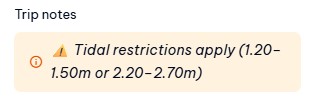
- Truck travel is tide dependent. Some services show a tide range where conditions are less ideal.
- Standard trucks can travel on services that show the tide range below, as well as services with no restrictions — you’re not limited to restriction-free times.
- Spaces shown online are a guide only. Final loading depends on vehicle size, weight and vessel requirements.
- Check your preferred travel times for both directions before clicking “Book”.
2How to Book Online
- Select your travel date and direction.
- Review the available services and any tide restriction notes.
- Choose your preferred departure and click “Book”.
- Select a return trip if required.
- Log in or create an account.
- Select your truck make and model.
- Choose “Empty” if your vehicle is under 6T per axle.
- Choose “Full” if your vehicle is over 6T per axle.
- Add a trailer if you’re towing one.
- Enter or check your vehicle details, including registration, weight, length and width.
- Continue to the cart.
- Edit the return vehicle details if your return trip is different — for example, towing a trailer back or returning lighter.
- Continue to payment and finalise your booking.
Choosing “Empty” or “Full”
- “Empty” doesn’t mean the truck must be empty — it simply helps us place your vehicle correctly on the vessel.
- You can still amend the estimated vehicle weight.
- Maximum allowed weight is 12T per axle.
3If the Trip Isn’t Available
- If there’s an issue with your selected service, such as a tide restriction, the system will let you know after you click “Continue”.
- Simply choose another suitable service.
4After Booking
- Your booking is finalised once payment is complete.
- Check your confirmation carefully.
- If any vehicle details are incorrect, try to update them online first. If you need help, contact us as soon as possible.
- Arrive at least 20 minutes before departure unless advised otherwise.
- Our crew may complete additional checks for weight, tide restrictions or loading requirements.
Magnetic Island Ferries • The only vehicle ferry to Magnetic Island